ChatGPT
 Claude
 Perplexity
 Google AI
In this article
- In short
- Does Shopify have a built-in affiliate program?
- How does an affiliate program on Shopify work?
- What are your options to set up an affiliate program on Shopify?
- How do you keep your codes off coupon sites?
- What does Fluenceur do once your Shopify store is connected?
- How much does a Shopify affiliate program cost per month?
- What comes after setup?
- Frequently asked questions
- Key takeaways
The Shopify admin does not manage affiliates: to set up an affiliate program on Shopify, you connect a tool to your store, and it gives each creator a tracked link and a code, attributes orders, calculates the commission and prepares the payouts. Which tool you pick matters less than four settings: refunds, leaking codes, the link versus code rule, and how creators get paid.
Does Shopify have a built-in affiliate program?
Not in the store admin, which creates discount codes, not affiliates. A code created by hand credits the sale to no one and calculates no commission. Shopify offers affiliate marketing in a separate app you install, Shopify Collabs.
Searching "Shopify affiliate program" often leads somewhere else: Shopify's own affiliate program. It pays people with an audience of merchants a commission when a merchant they refer buys a full-price Shopify plan. It has nothing to do with the program you open to your creators.
How does an affiliate program on Shopify work?
An affiliate program ties each order to the person who drove it, then pays that person a share of the sale.
- A tracked link per creator. It records the visit, then the order that follows.
- A code per creator. It catches the purchase made without a click: a story with no link, an order placed that night on another device. When an order carries one creator's link and another's code, you need a written rule: Measuring creator sales: link, code or tag? covers it.
- A commission. A percentage of the sale or a fixed amount per order. The rate starts from your margin: What commission rate should you pay creator affiliates?.
- Refunds. A returned order is not a sale. If the tool does not read your store's refunds, you pay commission on a product that is back in stock.
- Payouts. Ten creators means ten transfers and ten receipts a month, unless the tool groups them.
The launch checklist, to copy into your planning doc:
LAUNCH CHECKLIST: [BRAND] AFFILIATE PROGRAM

1. Margin: the commission and the customer discount both fit inside the product margin.
2. Commission: [X]% of the sale, or $[X] per order. Rate written down and announced.
3. Customer discount: [X]% off, on orders of $[X] or more, one use per customer.
4. Codes: one code per creator, never a shared code. Format decided once.
5. Link versus code: who gets the credit when an order carries one creator's link and another's code.
6. Refunds: a refunded order cancels its commission. Holding period before payout: [X] days.
7. Payouts: one date a month, one invoice per payout.
8. Disclosure: every post starts with "#ad" or says plainly that the creator earns a commission. "Affiliate link" alone may not be understood.What are your options to set up an affiliate program on Shopify?
There are three: a general-purpose affiliate app from the App Store, Shopify Collabs, or a creator platform connected to your store.
| General-purpose affiliate app | Shopify Collabs | Creator platform (Fluenceur) | |
|---|---|---|---|
| What it handles | Links, codes, commissions, payouts | Links, codes, gifts, commissions paid automatically | Creator search, invitations, links, codes, commissions, payouts |
| Recruiting creators | Mostly a signup page: you bring your own affiliates | Application page, direct invites, open access program | Creator Discovery, Social Listening, invitations and applications |
| Cost | Limited free plans, then roughly $30 to $200 a month, often plus 1% to 3% of affiliate sales | A 2.9% processing fee on every automatic commission payment, added to your Shopify bill | A free plan with no time limit, then paid plans |
| Main limit | Built for any kind of affiliate, coupon sites included; the creator relationship happens somewhere else | Not available on the Starter and Retail plans; each creator activates automatic payouts on their side to get paid | Built for creators: if your affiliates are partner websites only, a tracking app is enough |
App prices are the ones listed on the Shopify App Store; a high-end app starts at $249 a month. The Collabs fee, plan availability and payout setup are the ones published in Shopify's help center.
What decides it: where your affiliates come from. If they are partner sites you already know, a tracking app is enough. If they are creators you have to find, win over and follow up with, tracking sales is only a third of the work.
How do you keep your codes off coupon sites?
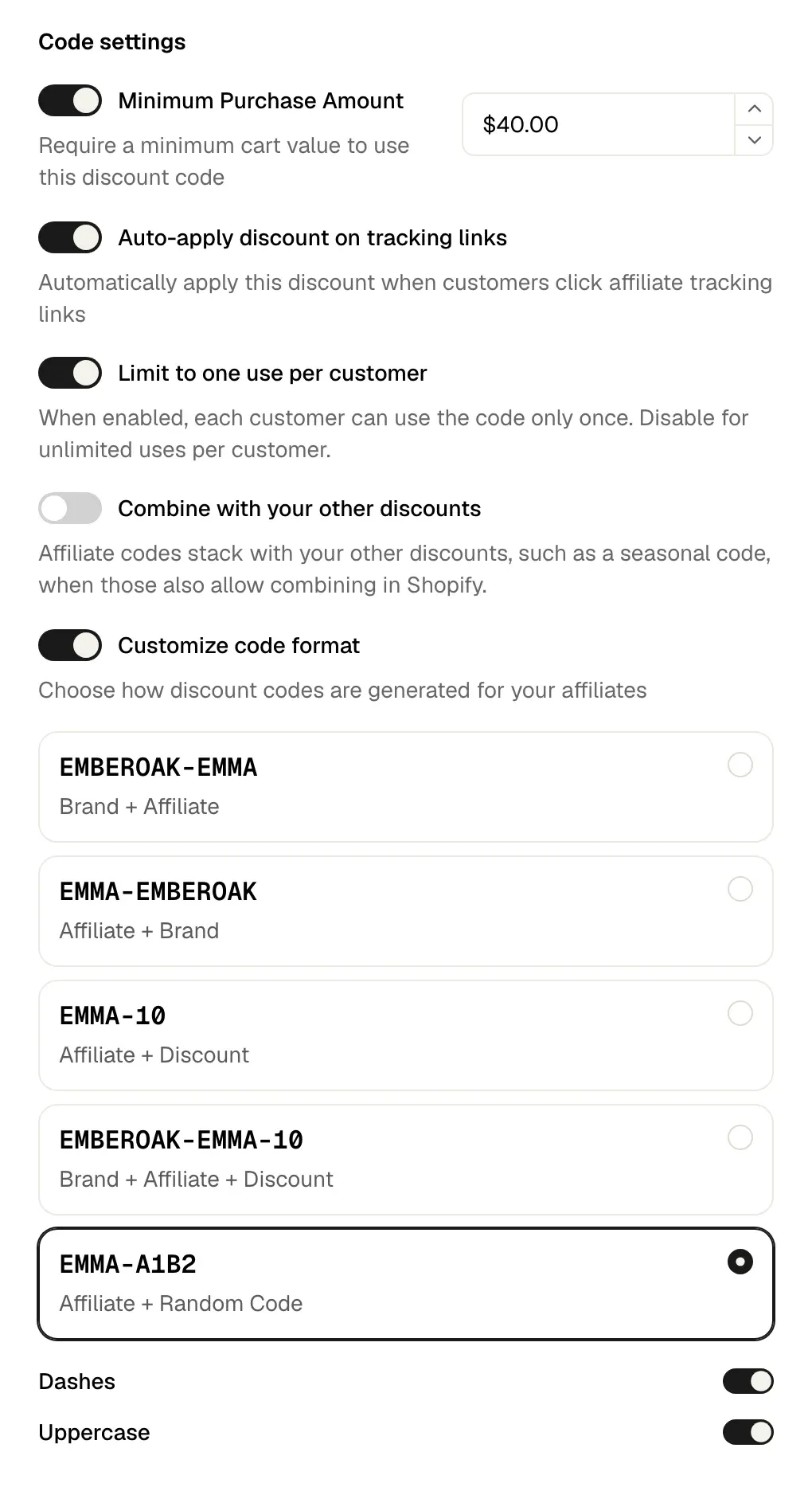
Four settings keep creator codes from leaking to coupon sites: one use per customer, a minimum purchase, a code format unique to each creator, and a discount applied by the link instead of a code shown on screen.
A code picked up by a coupon site gets used by customers who were going to buy anyway. You pay the discount, then a commission on a sale the creator did not drive. In Fluenceur, all four settings sit in the program's "Discount code" card:
- "Limit to one use per customer". A customer who found the code cannot reuse it on every order.
- "Minimum Purchase Amount". The discount stays off small orders, where it costs the most in proportion.
- "Customize code format". The "Affiliate + Random Code" preset adds a random string to the creator's name, so the code cannot be guessed. "Brand + Affiliate" stays easier to say in a video.
- "Auto-apply discount on tracking links". The creator shares their link, the discount is already in the cart, and the code never has to appear on screen.
As long as "Combine with your other discounts" stays off, a creator code does not stack with your sitewide promotions.
The sign of a leak: a creator's orders jump while their visits stay flat.
What does Fluenceur do once your Shopify store is connected?
Fluenceur creates each creator's link and code, attributes your store's orders, deducts refunds and pays the commissions.
The connection. In Settings, "Integrations", the Shopify card has a "Connect" button. The platform then lists "Discount codes created and synced for each creator" and "Automatic order and revenue tracking". The walkthrough is in How do you connect your Shopify store to Fluenceur?, the details on the Shopify integration page.
The program. "New Program" opens "Create Affiliate Program". In "Rewards details", the commission is set as a "Percentage" or a "Fixed Amount". A "Special reward" sets a different payout for the "Affiliate's first referred order" or the "First purchase of each new customer". The "Destination URL" sets the landing page, and "Allow affiliates to create product links" lets each creator point to the product they are showing.
The creators. "Invite affiliates" sends the invitation by link, email, DM or comment, and creators who apply to your program land in "Applications". Each affiliate gets a personal link and code; Fluenceur creates the code in Shopify. To find those creators, Creator Discovery searches by topic and filters by audience (country, age, interests), and Social Listening gathers the posts that name or tag your brand.
Attribution. The order is attributed by the link. If it carries another affiliate's code, the code wins.
Refunds. Fluenceur reads Shopify's refunds: a refunded order cancels its commission, a partial refund reduces it.
Payouts. You pay all the commissions at once, by card. Fluenceur pays each affiliate their share and issues one invoice per payout. The Affiliation page shows the whole setup.
How much does a Shopify affiliate program cost per month?
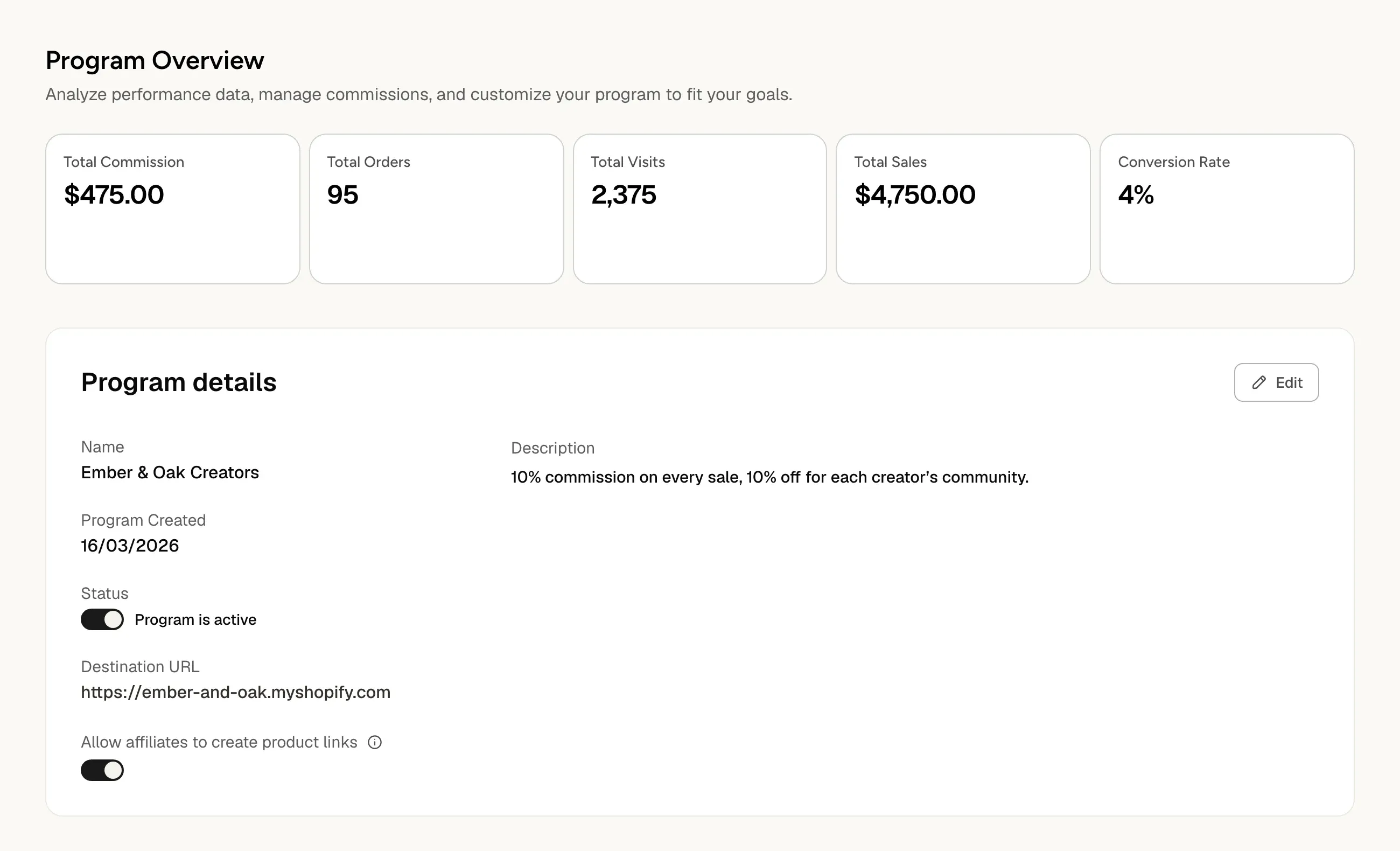
Over a month, an affiliate program on Shopify mostly costs the commission on your net sales, plus the price of the tool: in the example below, $475 in commission on $4,750 in sales.
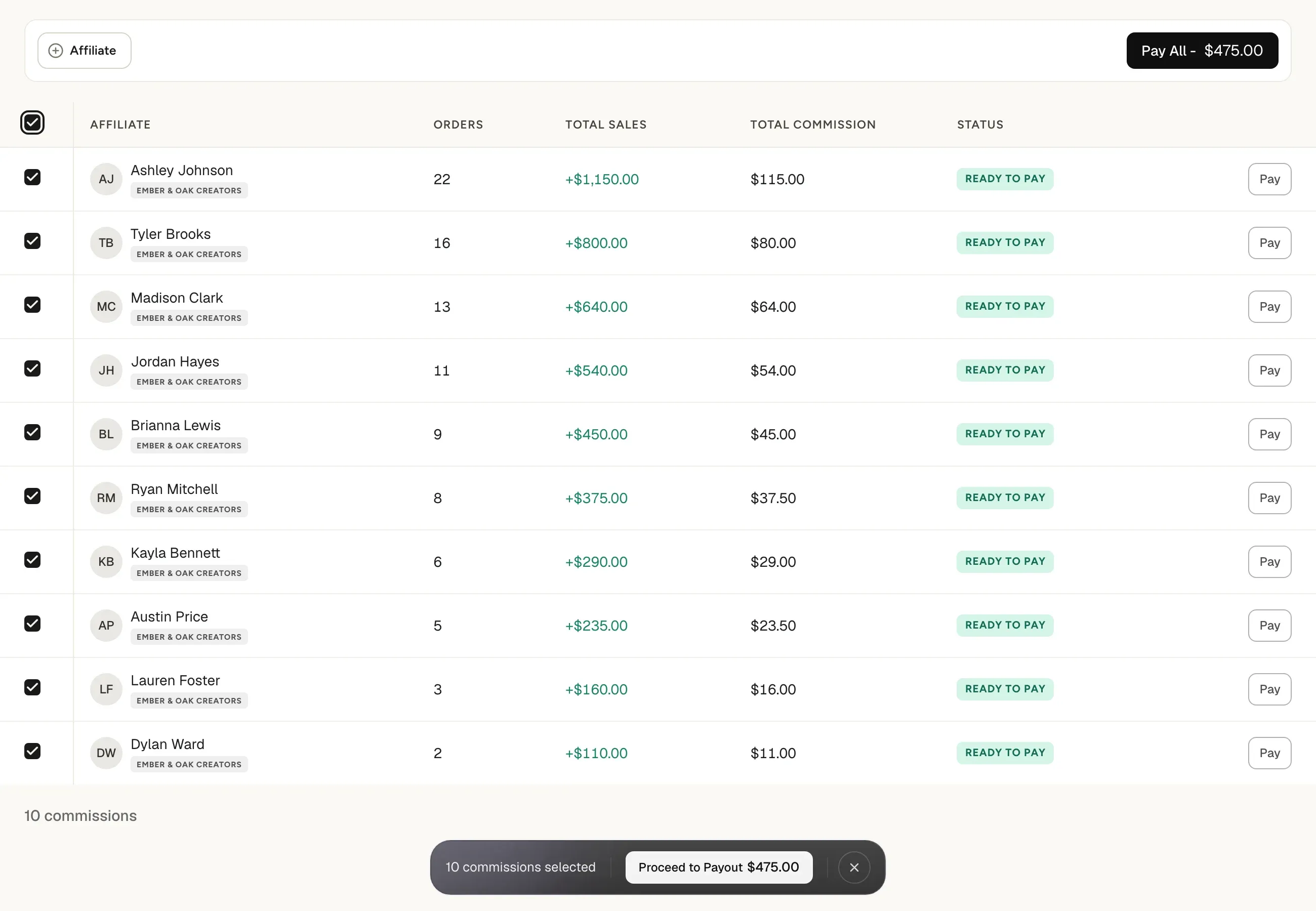
Ember & Oak is a fictional scented candle brand based in Portland, Oregon. Ten creators sell for it in March, at a 10% commission and a $50 average order, after the code discount and before shipping: that is the amount Fluenceur calculates the commission on.
| Line | Calculation | Amount |
|---|---|---|
| Attributed orders | 100 | |
| Average order | $50 | |
| Sales | 100 × $50 | $5,000 |
| Fully refunded orders | 5 orders × $50 | − $250 |
| Net sales | $5,000 − $250 | $4,750 |
| Commission due | 10% of $4,750 | $475 |
Without deducting the five returns, Ember & Oak would have paid $500. The gap tracks your return rate, and it repeats with every payout.
On the Commissions page, creators who have set up their payouts show the "Ready to pay" status. "Pay All", then "Proceed to Payout", sends the $475 to the creators "As soon as possible" or on the day you pick with "Schedule date". The "Payouts" and "Invoices" tabs keep a record of every payment.
What comes after setup?
A launched program only sells if the group is kept active: tiers, clear content guidelines, new creators every quarter. How do you build a brand ambassador program? covers that next step.
Frequently asked questions
Can you move an existing program over with its codes?
Yes. "Import from CSV" accepts a "Shopify discount code" column, so each creator keeps the code their audience already knows. A creator with no code gets one marked "Auto-generated".
What does a creator paid on commission have to disclose?
The relationship with your brand, clearly and conspicuously: that is the FTC's answer, in its FAQ on the Endorsement Guides, for anyone paid through affiliate links, and the closer the disclosure is to the recommendation, the better. The FTC adds that readers might not understand the words "affiliate link" alone, and that a personalized discount code signals a relationship without always making the payment clear. Its examples: start the post with "#ad", or say "I get commissions for purchases made through links in this post." The same FAQ asks brands for reasonable programs to train and monitor the people who promote them, including telling them exactly how to disclose: put the wording in your program terms.
What if my store runs on WooCommerce?
Fluenceur connects to WooCommerce too, and the program is built the same way: a link and a code per creator, the code created in your store, orders attributed, commissions paid.
Key takeaways
- The Shopify admin does not manage affiliates: an affiliate program on Shopify runs on a tool connected to the store, which gives each creator a link and a code.
- Two leaks eat into an affiliate program's margin: commissions paid on refunded orders, and codes picked up by coupon sites.
- With creators, tracking sales is not enough: you also have to find them, invite them and pay them, in one place.
Was this helpful?