How to Use AI-Powered Outreach to Recruit Creators (Without Landing in Spam)
Learn how to use AI-powered outreach to invite creators to your affiliate program. Step-by-step guide with templates and personalization tips.
Your outreach emails are landing in spam. Or worse, they're landing in the inbox and getting ignored. The average cold email reply rate sits at 4.5%, which means for every 100 creators you contact, fewer than 5 will bother responding. Meanwhile, the brands using AI-personalized creator outreach are seeing reply rates of up to 18%, nearly four times the average.
The difference? Those brands stopped sending the same copy-paste template to every creator on their list.
Key Takeaways
Generic outreach is dead: copy-paste emails trigger spam filters and get ignored by creators who receive dozens of brand pitches daily
AI personalization adapts each message to the creator's profile, content style, and audience, making every email feel hand-written
Personalized emails get 82% more responses than generic templates, with open rates 57% higher
Template variables + AI rewriting combine to create scalable outreach that doesn't sacrifice quality
Five anti-spam rules keep your invitations out of the junk folder and in front of creators who matter
The Creator Inbox Problem: Why Your Outreach Emails Go Unread
Creators with even modest followings receive 10 to 50 brand collaboration pitches per week. Most look like this: "Hi [Name], we love your content! We'd love to collaborate." Delete.
The problem compounds when brands blast identical emails to hundreds of creators at once. Email providers like Gmail and Outlook detect duplicate content across recipients. When 200 people receive the same message from the same sender, spam filters flag it. Your carefully crafted invitation never reaches the inbox.
Even when generic emails do get delivered, they compete with every other brand using the same template approach. Creators can spot a mass email instantly. No reference to their actual content, no understanding of their niche, no reason to believe this brand even knows who they are.
The cost is real: wasted hours writing emails nobody reads, missed partnerships with creators who would have been perfect affiliates, and competitors winning over the creators you wanted first.
How AI Creator Outreach Personalization Works
This is where AI-powered outreach pulls ahead. Instead of sending the same template to every creator, the AI reads each creator's profile and adapts your message to speak directly to them.
Here's what happens behind the scenes: the AI analyzes the creator's niche, their content style, their audience size, and their recent posts. It then rewrites your invitation template to reference what specifically makes that creator a good fit for your program. The result is an email that feels like you spent 10 minutes writing it personally, except the AI does it for hundreds of creators in seconds.
Same Template, 3 Different Creators
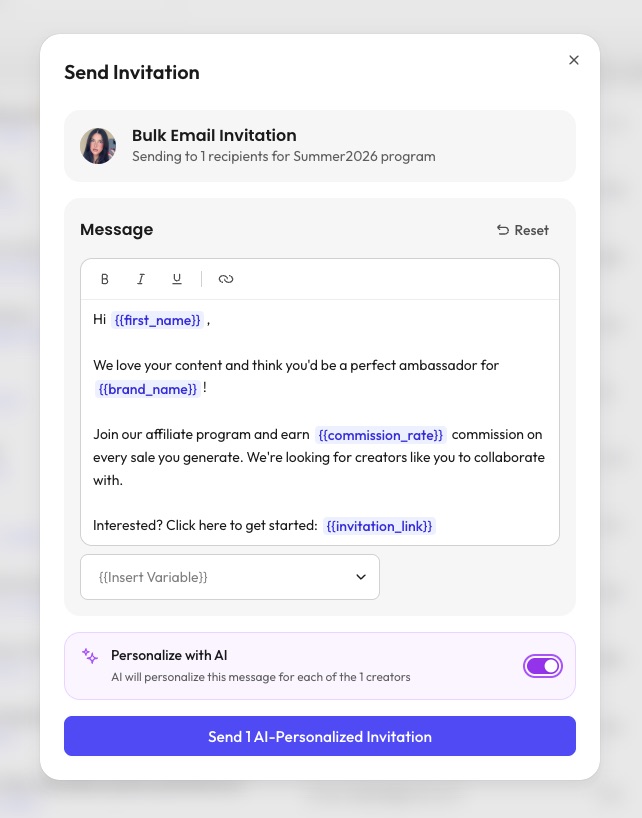
Start with a base template like the one in your invitation editor:
Hi {{first_name}}, we love your content and think you'd be a perfect ambassador for {{brand_name}}! Join our affiliate program and earn {{commission_rate}} commission on every sale you generate.
Now watch how the AI adapts it for three different creators:
Sarah (25K followers, skincare reviews):
Hi Sarah, your recent moisturizer comparison video was incredibly thorough, and your honest approach to skincare reviews is exactly what GlowSkin values. Join our affiliate program and earn 15% commission on every sale you generate. Your audience clearly trusts your recommendations, and we'd love for GlowSkin's clean beauty line to be one of them.
Marc (80K followers, home workout content):
Hi Marc, your home workout series has built one of the most engaged fitness communities on Instagram. FitGear's resistance bands and accessories are a natural fit for the exercises you already feature. Join our affiliate program and earn 15% commission on every sale you generate. We think your audience would love our products as much as we love your content.
Léa (12K followers, healthy recipes):
Hi Léa, your healthy meal prep content consistently inspires your audience to eat better, and your ingredient breakdowns are genuinely helpful. NaturaBio's organic ingredient line fits right in with the values you promote. Join our affiliate program and earn 15% commission on every sale you generate. We'd love to see your creativity with our products.
Generic Template
AI-Personalized
References creator's content
No
Yes, specific posts and style
Explains brand fit
Generic compliment
Tailored to their niche
Spam filter risk
High (duplicate content)
Low (unique per recipient)
Average reply rate
4.5%
Up to 18%
Each email is unique. Each email references real content the creator has posted. And because no two messages are identical, spam filters have no reason to flag them.
Setting Up Your First AI-Powered Invitation
Getting started takes less than five minutes. Here's the step-by-step process.
Step 1: Select Your Creators
From your creator discovery list, select the creators you want to invite. You can select one creator for a targeted approach or multiple creators for a bulk campaign. The AI personalization works the same way whether you're sending 1 or 100 invitations.
Step 2: Write Your Invitation Template
Open the invitation editor and write your base message. Use template variables to insert dynamic information:
{{first_name}}: the creator's name (always use this for a personal touch)
{{brand_name}}: your brand name (keeps the message on-brand)
{{commission_rate}}: the commission percentage (transparency builds trust)
{{invitation_link}}: the direct link for the creator to join (clear CTA)
Use the "Insert Variable" dropdown to add these without memorizing the syntax.
Step 3: Enable AI Personalization
Toggle the "Personalize with AI" switch at the bottom of the editor. When enabled, the AI will rewrite your template for each selected creator based on their profile. Your base template becomes the blueprint, and the AI adds the personal touches.
Step 4: Review and Send
Click "Send AI-Personalized Invitation." The button shows exactly how many personalized emails will be sent. Each creator receives a unique version of your message, tailored to their content and audience.
Note
Keep your base template under 150 words. The AI adds personalization on top of your template, so a concise base message gives the AI room to add relevant details without making the email too long. Creators prefer short, specific pitches over long-winded proposals.
Template Variables: What to Use and When
Not all variables are equal. Here's when each one makes the biggest impact.
{{first_name}} is non-negotiable. Emails without a first name get 22% fewer opens. Always include it in your greeting.
{{commission_rate}} builds instant trust. Creators want to know what they'll earn before they click anything. Being upfront about your commission structure (whether it's 10%, 15%, or 20%) signals that you're serious and transparent. Vague promises like "competitive rates" get ignored.
{{brand_name}} matters more than you think. It appears in the email preview text alongside the subject line. When a creator sees your brand name in context ("we think you'd be perfect for NaturaBio"), it immediately signals this isn't random spam.
{{invitation_link}} is your CTA. Place it after you've made your pitch, not at the very beginning. The creator should understand what they're signing up for before they see the link.
Note
Adjust your commission rate based on creator tier. Micro-creators (under 10K followers) often accept 10-15%, while mid-tier creators (50K-200K) may expect 15-20%. Setting the right rate in your template shows you understand their value.
5 Rules to Keep Your Outreach Out of Spam
AI personalization handles the biggest spam risk (duplicate content), but there are other factors to watch.
Never send identical emails to multiple creators. This is the number one trigger for spam filters. With AI personalization enabled, every email is unique, so this is handled automatically.
Keep subject lines personal and short. "Partnership opportunity" sounds like spam. "Sarah, a collab idea for your skincare series" sounds like a real person wrote it.
Avoid spam trigger words. Words like FREE, URGENT, EXCLUSIVE OFFER, and heavy use of exclamation marks or all-caps trigger spam filters. Write like you're messaging a colleague, not writing an ad.
Warm up before cold outreach. Follow the creator's account, engage with a few posts, and leave genuine comments before sending your first email. Consider starting with a creator gifting program to warm up the relationship before pitching your affiliate program. When your invitation arrives, they'll recognize your brand name. Check our guide on finding the right creators for discovery strategies.
Use a verified sending domain. Make sure your email domain has proper SPF, DKIM, and DMARC records. This is a technical step your IT team can handle in minutes, and it dramatically improves deliverability.
Once you've sent your first batch of AI-personalized invitations, track these metrics to improve over time:
Delivery rate: what percentage of emails actually reached the inbox (aim for 95%+)
Open rate: how many creators opened your email (20-40% is strong for outreach)
Reply rate: how many responded, positive or negative (10%+ with AI personalization)
Conversion rate: how many actually joined your affiliate program
Reply Rates by Personalization Level
No personalization4
Basic (name only)9
AI-personalized18
A/B test your base templates. Try different opening lines, different levels of detail about your program, and different commission structures. The AI personalizes on top of your template, so a stronger base template produces even better results.
If a creator doesn't reply, wait 5 to 7 days before following up once. Reference your original email and add something new (a limited-time commission boost, a new product launch, or a specific campaign idea). After two attempts with no response, move on. Persistence is good. Pestering is not.
Stop Spraying, Start Converting
The era of mass generic outreach is over. Creators are too savvy, email providers are too smart, and your competitors are already using better tools.
AI-personalized outreach is the difference between your invitation sitting in a spam folder and a creator excitedly signing up for your affiliate program. Every email references the creator's actual content. Every message feels hand-written. And every invitation lands where it should: in front of a creator who is genuinely the right fit for your brand.
With a platform like Fluenceur, you can set up your first AI-powered campaign, hit send, and watch your response rates climb.